Why Your PDF Menu Is Costing You Customers
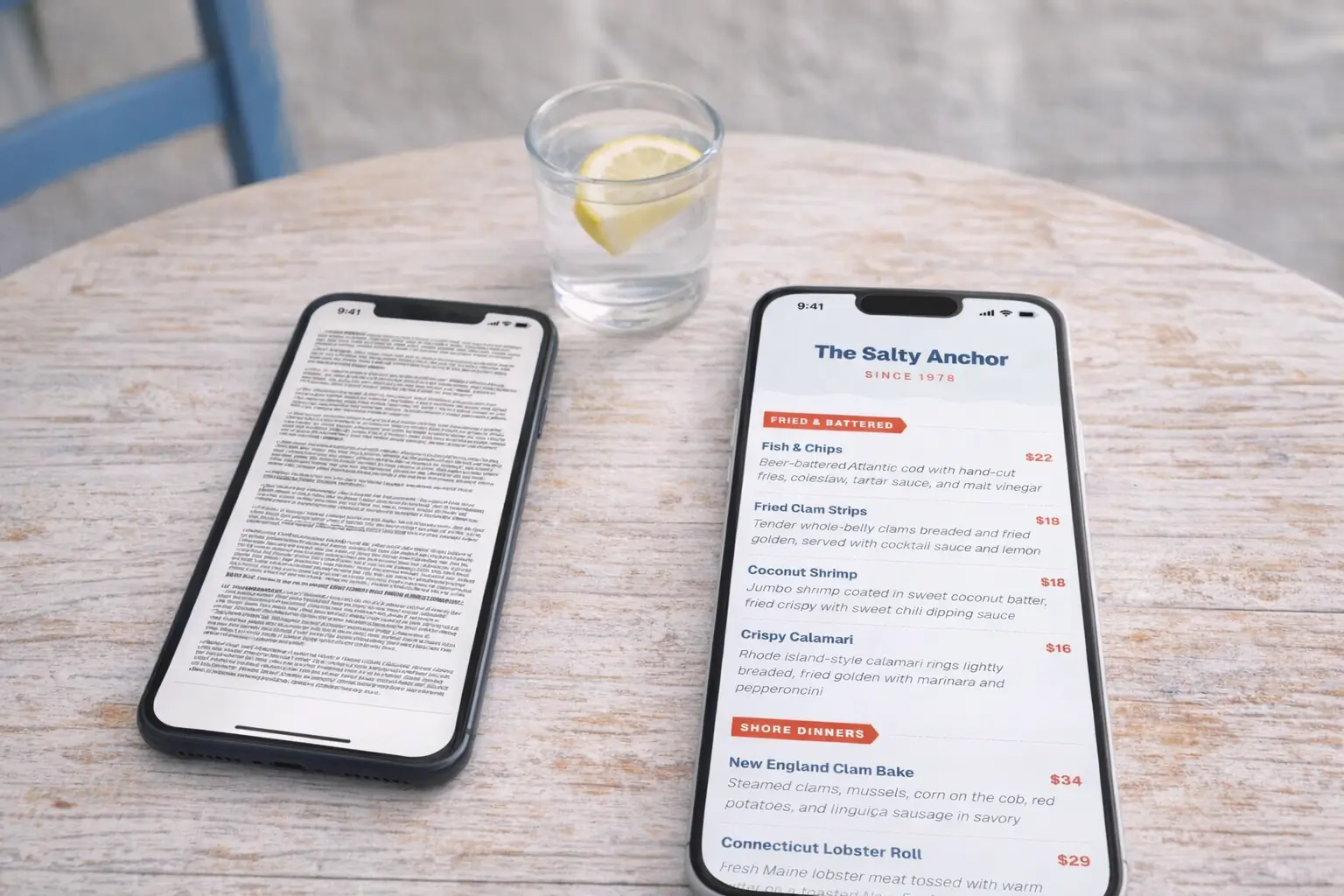
You’ve got a QR code on your tables. You’ve uploaded your menu to your website. You might even feel like you’ve “gone digital.” But if that QR code links to a PDF file, you haven’t solved the problem. You’ve just moved it to a smaller screen.
PDF menus remain the most common digital menu format, and they’re also the worst. They’re frustrating for customers, invisible to search engines, impossible to update quickly, and they give you zero information about what your customers actually look at.
Here’s why your PDF menu is a liability, and what to do about it.
The PDF Menu Problem
Let’s be clear about what this means in practice. A PDF menu is a fixed-layout document, usually designed for print, that’s been uploaded to a website or linked from a QR code. It might look fine on a desktop monitor. On a phone, which is where 90%+ of QR scans happen, it’s a disaster.
PDFs aren’t bad. They’re great for print documents. But they were never designed for mobile viewing, and forcing them into a mobile context creates a bad experience.
Problem 1: PDF Menus Are Terrible on Mobile
Pinch-to-Zoom Frustration
Open a PDF menu on your phone right now. You’ll immediately pinch to zoom in because the text is too small to read. Then you’ll drag the page around trying to find the section you want. Then you’ll accidentally zoom too far and lose your place. Then you’ll do it again for the next page.
This is not browsing. This is wrestling with a document. And every second a customer spends fighting with your menu format is a second they’re not enjoying the experience of choosing their meal.
Studies on mobile user behavior show that people abandon content that’s hard to interact with on their device. They don’t complain. They just leave, or they order the first thing they recognize rather than exploring your menu.
Slow Download Times
PDFs are heavy files, especially if they contain high-resolution images. On a busy restaurant’s WiFi, or worse, on cellular data in a building with thick walls, a multi-page PDF can take 10-30 seconds to download.
A properly built mobile menu page loads in under 2 seconds. That’s the difference between a customer actually browsing your menu and a customer staring at a loading spinner while their server comes back to take their order.
Problem 2: You Can’t Update Them in Real Time
Out-of-Date Prices
Raised your prices last month? If you haven’t regenerated and re-uploaded your PDF, your online menu still shows the old prices. Customers see one price online, another on the bill, and now they’re annoyed.
Worse, if your PDF is linked from Google Business Profile, third-party directories, and your own website, you need to update it everywhere. Miss one, and you’ve got inconsistent pricing floating around the internet.
Items You No Longer Serve
Running out of a special ingredient happens. Seasonal items rotate. Popular dishes sell out mid-service. With a PDF, you can’t reflect any of these changes until you create a new document, export it, and upload it to every place it lives.
With a proper digital menu, the change happens once and it’s live everywhere instantly. The QR code doesn’t change. It always points to the current version.
Problem 3: No Analytics or Insights
You Don’t Know What Customers Look At
A PDF gives you zero data. You don’t know:
- Which items customers view most
- How long they spend on each section
- Whether they scroll past your appetizers to go straight to entrees
- What time of day people are checking your menu
- Whether mobile or desktop visitors behave differently
This kind of data is gold for menu engineering. If you knew that 70% of customers never scroll to your dessert section, you’d move desserts higher. If you knew that your most profitable appetizer gets very few views, you’d reposition it. A PDF hides all of this from you.
You Can’t Measure Menu Performance
When you make a menu change (new item, new price, new description), did it work? With a PDF, there’s no way to know unless you’re manually tracking sales data and correlating it with menu changes. A digital menu with analytics tells you directly.
Problem 4: They Hurt Your SEO
Search Engines Can’t Index PDF Menus Well
When someone searches “Italian restaurant near me” or “best pasta downtown,” Google looks at your website content to determine relevance. Text on a properly built web page is fully indexable. Your menu items, descriptions, and categories all become searchable content.
PDF text is technically indexable, but Google treats it as secondary content. It doesn’t get the same weight as HTML text, it doesn’t generate rich snippets, and it doesn’t help your local search ranking the way proper on-page content does.
Missing Out on Local Search Traffic
People search for specific dishes. “Lobster roll near me.” “Best ramen downtown.” “Gluten-free pizza.” If your menu exists as an indexable web page, those dish names can surface in search results. If your menu is locked in a PDF, they probably won’t.
For restaurants that depend on walk-in traffic and local discovery, this is real money left on the table.
Problem 5: They Look Unprofessional
First Impressions Matter
Your menu is often the first substantive interaction a potential customer has with your restaurant. They search for you, click on your website, and open your menu. If what they see is a grainy PDF that requires zooming and scrolling, the impression isn’t “this restaurant has great food.” It’s “this restaurant hasn’t updated their technology since 2019.”
That might sound harsh, but customer expectations have shifted. Over 70% of US restaurants now use some form of proper digital menu. The ones still using PDFs are increasingly in the minority, and customers notice.
Your Competitors Are Moving On
If the restaurant down the street has a sleek, mobile-optimized menu with photos and clear descriptions, and yours requires pinch-to-zoom on a PDF, you’re losing the comparison before the customer even walks through the door.
It’s not about being trendy. Customers just expect a certain baseline now, and a PDF doesn’t clear it.
The Alternative: Interactive Digital Menus
What a Modern Menu Looks Like
A proper digital menu is a mobile-optimized web page. It:
- Loads instantly (under 2 seconds)
- Is designed for phone screens (no zooming required)
- Has clear categories with easy navigation
- Includes photos where appropriate
- Shows dietary labels and allergen information
- Updates in real time when you make changes
- Works with QR codes, website links, and Google Business Profile
Pre-designed templates handle the design work, so it looks polished without you having to think about layout or typography. You just add your content.
How Easy It Is to Switch
This is the part that surprises most restaurant owners. Switching from a PDF to a proper digital menu takes about 30 minutes.
Platforms like MenuStack offer AI-powered menu builders that can generate your entire menu from a brief description. You review it, customize it with your actual dishes and prices, choose a template, and you’re live.
Your existing QR codes? If they link to a specific URL, just update the destination. Or generate new codes. It takes seconds.
Making the Switch in 30 Minutes
Here’s the actual process:
- Sign up for a free account on a QR menu platform. (5 minutes)
- Choose a template that matches your restaurant’s style. (3 minutes)
- Enter your menu content, or use AI to generate it from your existing menu. (15 minutes)
- Pick a color scheme and add your logo. (5 minutes)
- Generate a QR code and test it on your phone. (2 minutes)
That’s it. You now have a mobile-optimized digital menu that you can update any time, that gives you analytics on customer behavior, and that search engines can actually index.
The PDF served its purpose. It’s time to move on.
Replace your PDF menu today. Create a free digital menu with MenuStack